Fastest MS SQL Inserts — Part 6: Parallel Threads
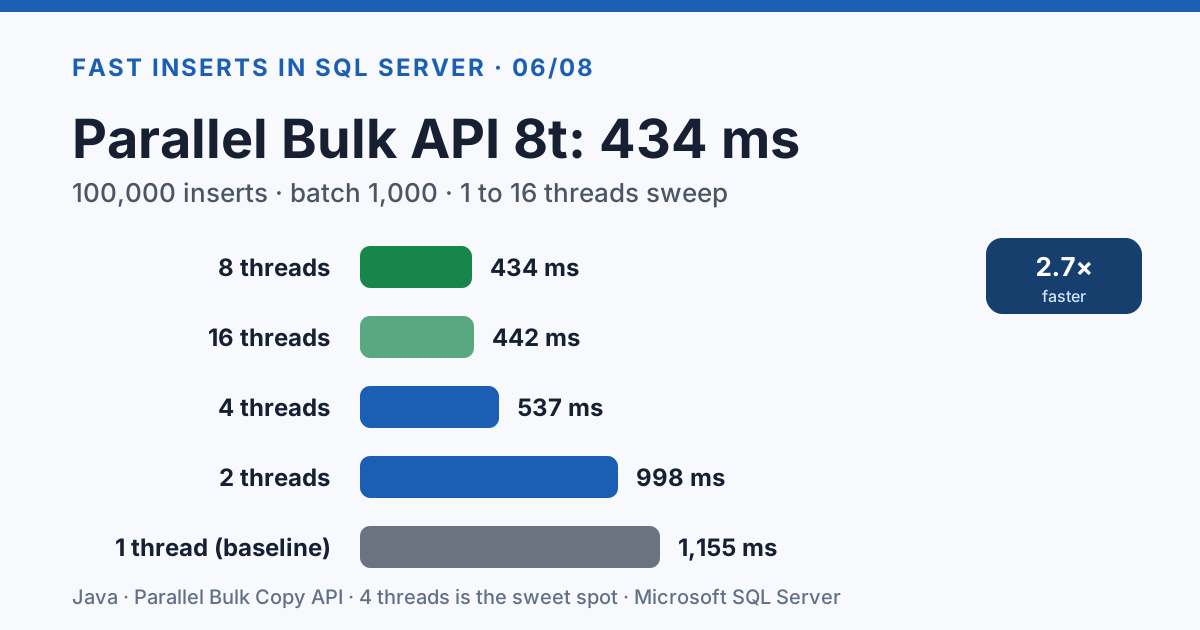
Every strategy we've tested so far — Hibernate, JDBC, Bulk API — pushes data through a single connection. SQL Server handles concurrent writes just fine; the bottleneck is the serial nature of one TCP stream. Split 100k rows across 4 threads with 4 connections and the Bulk API drops from 492 ms to 330 ms, the fastest Java-client result in the whole series.
But parallelism isn't a free lunch — threads past 4 give diminishing returns, concurrent readers slow the writers 2.5x, and the TABLOCK hint changes the trade-off. Here's where the inflection points actually are.
The Approach
The idea is straightforward:
- Partition the data into N chunks (one per thread)
- Each thread opens its own connection from the HikariCP pool
- Each thread inserts its chunk independently
- Wait for all threads to complete
 1@Service
 2public class ParallelInsertExecutor {
 3    private final BulkCopyRepository bulkCopyRepository;
 4
 5    public void parallelBulkApiInsert(List<Person> people,
 6                                       TableDescriptor<Person> table,
 7                                       int batchSize, int threadCount) {
 8        List<List<Person>> chunks = partition(people, threadCount);
 9        ExecutorService executor = Executors.newFixedThreadPool(threadCount);
10
11        List<CompletableFuture<Void>> futures = new ArrayList<>();
12        for (List<Person> chunk : chunks) {
13            futures.add(CompletableFuture.runAsync(
14                    () -> bulkCopyRepository.performBulkInsert(chunk, table, batchSize),
15                    executor));
16        }
17        CompletableFuture.allOf(futures.toArray(new CompletableFuture[0])).join();
18        executor.shutdown();
19    }
20}
Important: HikariCP's pool size must be at least threadCount, otherwise threads block waiting
for connections. The default pool size (10) is fine for up to 10 threads.
Thread Count Sweep: Bulk API
| Threads | Avg ms | Speedup vs 1 thread |
|---|---|---|
| 1 | 1,155 | 1.0x |
| 2 | 998 | 1.2x |
| 4 | 537 | 2.2x |
| 8 | 434 | 2.7x |
| 16 | 442 | 2.6x |
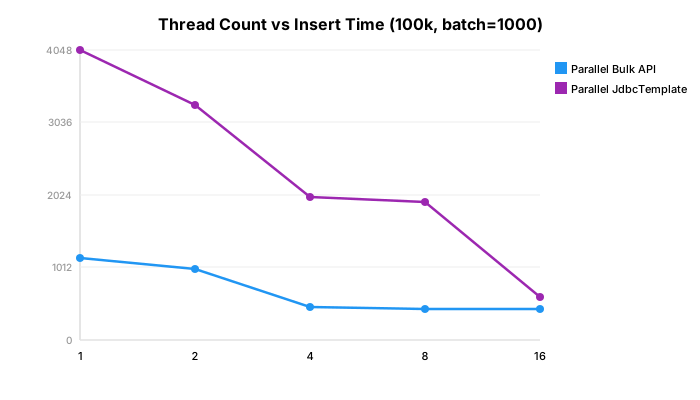
4 threads is the sweet spot for Bulk API. Going to 8 threads helps slightly, but 16 threads is actually marginally slower — the SQL Server bulk copy engine saturates the I/O subsystem and additional threads just add contention.
Thread Count Sweep: JdbcTemplate
| Threads | Avg ms | Speedup vs 1 thread |
|---|---|---|
| 1 | 4,048 | 1.0x |
| 2 | 3,292 | 1.2x |
| 4 | 2,407 | 1.7x |
| 8 | 1,937 | 2.1x |
| 16 | 608 | 6.7x |
JdbcTemplate benefits much more from parallelism — because each thread's PreparedStatement batch is independent and the driver sends SQL statements over TCP. More threads = more concurrent TCP streams = more bandwidth utilization. The 16-thread result (608ms) is remarkable.
The Ultimate Combination: Multi-Value + Parallel
What happens when we combine multi-value inserts (400 values per INSERT, from Part 3) with parallel threads?
| Strategy | Avg ms |
|---|---|
| Multi-value 400, 1 thread | 1,058 |
| Multi-value 400, 4 threads | 426 |
| Multi-value 400, 8 threads | 368 |
| Parallel Bulk API, 4 threads | 330 |
Multi-value 400 + 8 threads (368ms) is competitive with parallel Bulk API (330ms) — and the multi-value approach works with any JDBC driver, not just MS SQL Server's Bulk API.
Important caveat: Multi-value INSERT is incompatible with useBulkCopyForBatchInsert=true
(see Part 8 for details). You must choose one or the
other — both are excellent, but they cannot be combined.
Scaling to 1 Million Rows
| Strategy | 100k rows | 1M rows | Scales linearly? |
|---|---|---|---|
| Bulk API (single) | 492 | 6,225 | ~12.7x (yes) |
| Parallel Bulk API 4t | 330 | 4,427 | ~13.4x (yes) |
| TVP | 818 | 7,314 | ~8.9x (yes) |
| JdbcTemplate | 2,985 | 11,914 | ~4x (sublinear!) |
All strategies scale roughly linearly with data size. JdbcTemplate actually gets better at scale because the fixed overhead (connection setup, batch compilation) is amortized over more rows.
Practical Considerations
Connection pool sizing: Set spring.datasource.hikari.maximum-pool-size to at least your
thread count. Setting it too high wastes SQL Server connections.
ID generation: If using application-generated IDs, ensure no collisions across threads. In our test, each thread gets a distinct partition so IDs don't overlap.
Error handling: If one thread fails, the others may have already committed. Use a
CountDownLatch or check futures for exceptions before declaring success.
Lock contention: SQL Server uses row-level locking for INSERTs by default. You won't get table locks unless you're inserting into the same page from many threads simultaneously with very small rows.
Concurrent Reads During Insert
In production, tables aren't idle during bulk loads — other sessions are reading. How much does concurrent reading impact insert performance?
| Scenario | Bulk API (avg ms) |
|---|---|
| No concurrent reads | 814 |
| 4 reader threads (SELECT COUNT/AVG) | 2,037 (2.5x slower) |
Concurrent readers slow inserts by 2.5x, even when readers use WITH (NOLOCK). The slowdown
comes from I/O contention and SQL Server's latch management on the data pages being written.
TABLOCK hint can help here — it acquires a table-level lock that prevents readers entirely, allowing uninterrupted bulk insertion:
| Hint | JDBC batch (avg ms) |
|---|---|
| No hint (row locks) | 4,240 |
WITH (TABLOCK) | 2,991 (30% faster) |
Trade-off: TABLOCK blocks all other writers AND readers during the insert. Use it only for dedicated bulk load windows.
The one thing to remember
4 threads × Bulk API = 330 ms. You can't go meaningfully faster from a Java client. 8 threads saves another 100 ms; 16 threads is noise. Multi-value INSERT at 400 rows per statement × 8 threads gets 368 ms without needing the Bulk API at all.
If your load window overlaps with concurrent SELECTs, parallel inserts take ~2.5x longer. Use
WITH (TABLOCK) for dedicated windows — otherwise, pick 4 threads and move on.
Next: Part 7 — Index Impact measures the hidden cost of non-clustered indexes during bulk loads.