Fastest MS SQL Inserts — Part 2: JDBC Strategies
Introduction
In the previous post Fastest way to insert the data in MS SQL - Part 1 Hibernate Batching we compared the performance of Hibernate inserts with batching turned off vs batching turned on. In this post, we will explore other ways to insert data into MS SQL server and compare performance with Hibernate.
We will consider four different ways to persist data:
- Using Hibernate batching, calling persist method.
- Manually inserting data using a prepared statement with batching.
- Using Spring Data Jdbc Template with batching.
- Using Microsoft Bulk API.
Hibernate Batching
Hibernate batching is implemented as following:
 1@Override
 2public <T> void persistAndFlushInChunks(List<T> objects, int bulkInsertBatchSize) {
 3	if(CollectionUtils.isEmpty(objects)){
 4		return;
 5	}
 6
 7	// set manual flush mode
 8	entityManager.setFlushMode(FlushModeType.COMMIT);
 9	entityManager
10			.unwrap(Session.class)
11			.setJdbcBatchSize(bulkInsertBatchSize);
12
13	for(List<T> chunk : Lists.partition(objects, bulkInsertBatchSize)) {
14		persistAndFlushObjects(chunk);
15	}
16}
17
18private <T> void persistAndFlushObjects(Iterable<T> objects) {
19	for (T object : objects) {
20		entityManager.persist(object);
21	}
22	entityManager.flush();
23	entityManager.clear();
24}
This post details the identical implementation as the previous one. I enabled manual flush mode to gain enhanced control over when data gets transmitted to the MS SQL server. Following each flush, I clear the entity manager, as the objects have already been persisted in the database and are no longer needed in memory.
Manually Inserting Data With Prepared Statement
Since all actions are performed manually, a substantial amount of code has been written to facilitate this process. Therefore, I will simply outline the key components and provide an explanation of how each element operates.
 1public <T> void insert(List<? extends T> objects, TableDescriptor<T> descriptor, int batchSize) {
 2    Session session = entityManager.unwrap(Session.class);
 3
 4    session.doWork(connection ->
 5            insertInternal(objects, descriptor, connection, batchSize));
 6}
 7
 8private <T> void insertInternal(List<? extends T> objects,
 9                                TableDescriptor<T> descriptor,
10                                Connection connection,
11                                int batchSize) throws SQLException {
12
13    try (PreparedStatement preparedStatement = prepareInsertStatement(descriptor, connection, 1)) {
14
15        for (int i = 0; i < objects.size(); i++) {
16            @NonNull List<ColumnDescriptor<T>> columns = descriptor.getColumns();
17            for (int j = 0; j < columns.size(); j++) {
18                ColumnDescriptor<T> columnDescriptor = columns.get(j);
19                preparedStatement.setObject(j + 1, columnDescriptor.getObjectFieldValue(objects.get(i)));
20            }
21            preparedStatement.addBatch();
22            if ((i + 1) % batchSize == 0) {
23                preparedStatement.executeBatch();
24                preparedStatement.clearBatch();
25            }
26        }
27        preparedStatement.executeBatch();
28        preparedStatement.clearBatch();
29    }
30}
The method takes three parameters: a list of Person objects to insert,
a TableDescriptor providing information about the database table, and a batch size.
Table descriptor contains column names and a mapping function for data that is used for preparing statement: columnDescritor.getObjectFieldValue(object).
This method utilizes Hibernate to obtain a database session and connection.
The actual insertion process is carried out by the insertInternal method, which prepares a PreparedStatement for inserting data.
It iterates through the list of objects, sets their values in the prepared statement, and adds them to a batch.
When the specified batch size is reached, the batch is executed, and this process is repeated until all objects
are inserted.
Using Spring Data Jdbc Template With Batching
 1public <T> void insertBulk(TableDescriptor<T> tableDescriptor,
 2                           List<? extends T> data,
 3                           int batchSize) {
 4    if (data.isEmpty()) return;
 5    String insertQuery = getInsertQuery(tableDescriptor, 1);
 6    jdbcTemplate.batchUpdate(insertQuery,
 7            data,
 8            batchSize,
 9            (ps, argument) -> {
10                List<ColumnDescriptor<T>> columns = tableDescriptor.getColumns();
11                for (int i = 0; i < columns.size(); i++) {
12                    ColumnDescriptor<T> columnDescriptor = columns.get(i);
13                    ps.setObject(i + 1, columnDescriptor.getObjectFieldValue(argument));
14                }
15            });
16}
This method represents the most straightforward approach I've employed for batch data persistence.
It leverages the Spring data JdbcTemplate class, which offers a user-friendly interface and abstracts
away the intricacies of batching within the method.
I supplied the query, data, and batchSize as parameters, with the only manual task being the population
of a prepared statement with the data.
Microsoft Bulk Api
 1public <T> void performBulkInsert(List<? extends T> data,
 2                              TableDescriptor<T> descriptor,
 3                              int batchSize) {
 4    Session unwrap = entityManager.unwrap(Session.class);
 5
 6    unwrap.doWork((connection) -> {
 7        try (SQLServerBulkCopy bulkCopy =
 8                     new SQLServerBulkCopy(connection.unwrap(SQLServerConnection.class))) {
 9            SQLServerBulkCopyOptions options = new SQLServerBulkCopyOptions();
10            options.setBatchSize(batchSize);
11            bulkCopy.setBulkCopyOptions(options);
12            bulkCopy.setDestinationTableName(descriptor.getTableName());
13
14            CachedRowSet dataToInsert = createCachedRowSet(data, descriptor);
15            // Perform bulk insert
16            bulkCopy.writeToServer(dataToInsert);
17        }
18    });
19}
20
21private <T> CachedRowSet createCachedRowSet(List<? extends T> data, TableDescriptor<T> descriptor) throws SQLException {
22    RowSetFactory factory = RowSetProvider.newFactory();
23    CachedRowSet rowSet = factory.createCachedRowSet();
24
25    rowSet.setMetaData(createMetadata(descriptor));
26
27    for (T rowData : data) {
28        rowSet.moveToInsertRow();
29        for (int i = 0; i < descriptor.getColumns().size(); i++) {
30            ColumnDescriptor<T> column = descriptor.getColumns().get(i);
31            rowSet.updateObject(i + 1, column.getObjectFieldValue(rowData), column.getSqlType());
32        }
33        rowSet.insertRow();
34    }
35
36    rowSet.moveToCurrentRow();
37    return rowSet;
38}
39
40private static  <T> RowSetMetaData createMetadata(TableDescriptor<T> descriptor) throws SQLException {
41    RowSetMetaData metadata = new RowSetMetaDataImpl();
42
43    // Set the number of columns
44    metadata.setColumnCount(descriptor.getColumns().size());
45    for (int i = 0; i < descriptor.getColumns().size(); i++) {
46        metadata.setColumnName(i + 1, descriptor.getColumns().get(i).getColumnName());
47        metadata.setColumnType(i + 1, descriptor.getColumns().get(i).getSqlType());
48    }
49    return metadata;
50}
This data insertion method operates in much the same way as the preceding ones. The primary distinction lies in its utilization of the MS SQL server bulk API. This API is typically employed for importing data from a file into a table. However, in this instance, the source is a collection held in memory, rather than a file.
Results
I conduct the tests using varying batch sizes for each method,
specifically batch sizes of 10, 100, and 1,000. 100,000 Person
objects are persisted to the database.
In each test scenario, I run the test 10 times and compute the median value
from the results. Following the completion of each test,
I truncate the Person table. My measurements exclusively focus on the time
taken for the insert operations to conclude.
| Method Name | Median Duration Ms | Batch Size |
|---|---|---|
| Bulk Api | 314 | 10000 |
| Bulk Api | 432 | 1000 |
| Bulk Api | 1504 | 100 |
| Jdbc Template | 1508.5 | 10000 |
| Prepared Statement | 1520 | 10000 |
| Jdbc Template | 1551.5 | 1000 |
| Prepared Statement | 1559.5 | 1000 |
| Hibernate Persist | 1732 | 10000 |
| Prepared Statement | 1770.5 | 100 |
| Hibernate Persist | 1778 | 1000 |
| Jdbc Template | 1783 | 100 |
| Hibernate Persist | 2281 | 100 |
| Prepared Statement | 2583 | 10 |
| Jdbc Template | 2618.5 | 10 |
| Hibernate Persist | 4850.5 | 10 |
| Bulk Api | 10178.5 | 10 |
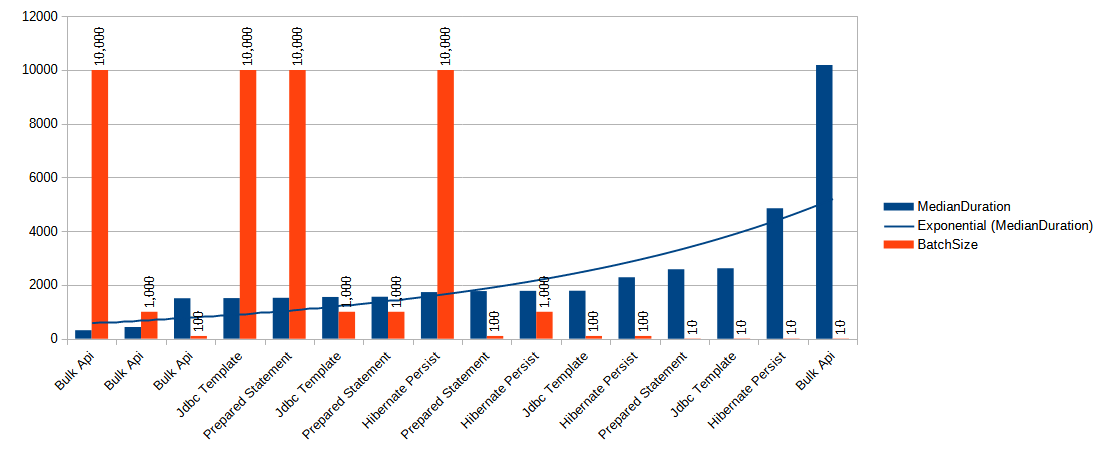
Conclusion
Right from the start, it's apparent that the Bulk API is both the speediest and, paradoxically, the slowest data insertion method. When dealing with small batch sizes, its performance can be agonizingly sluggish. However, as we scale up the batch size, it truly shines and demonstrates itself as the optimal and swiftest means of inserting data into the MS SQL server database.
The Jdbc Template and Prepared Statement methods exhibit nearly identical performance levels, which isn't surprising since they essentially share the same underlying code.
Furthermore, we can deduce that Hibernate Persist is the least efficient method for data persistence across various batch sizes (excluding a batch size of 10). While the difference in speed is relatively minor for larger batch sizes, it introduces approximately a 10% increase in processing time for batch sizes of 10,000 and 1,000. Moreover, this overhead becomes more pronounced when dealing with smaller batch sizes.
We can employ an additional technique when working with a prepared statement. In our previous tests, we conducted inserts using the following statement:
1insert into Person(person_id, user_name, first_name, last_name, years) values (?,?,?,?,?)
With this statement, we insert one person object at a time. However, MS SQL Server supports an alternative syntax:
1insert into Person(person_id, user_name, first_name, last_name, years) values (?,?,?,?,?),(?,?,?,?,?)...
Allowing us to insert multiple sets of values in a single statement, up to a limit of 2,100 parameters. In my upcoming post, I will assess the performance of this method and compare it to the fastest Bulk API insert to determine its efficiency.
Thank you for your attention.
Test yourself
Which strategy was fastest for bulk inserts in the benchmark?
The SQL Server Bulk Copy API finished 100,000 inserts in 492 ms, about 6x faster than Hibernate persist.
Re-benchmarked (October 2026)
The same benchmark re-run on the same machine (i5-4690K) three years later. Environment: CPU fixed at 3.5 GHz (performance governor, turbo disabled), benchmark JVM pinned to an isolated core (cpu3), SQL Server 2025 Developer on Ubuntu, Temurin JDK 21, median of 10 timed runs per scenario, 100,000 rows. Note: batch sizes tested were 10, 100, 1,000, and 5,000 (the original table used 10,000 instead of 5,000).
| Method name | Median duration ms | Batch size |
|---|---|---|
| Bulk Api | 13006 | 10 |
| Bulk Api | 1770 | 100 |
| Bulk Api | 510 | 1000 |
| Bulk Api | 364 | 5000 |
| Jdbc Template | 3213 | 10 |
| Jdbc Template | 2130 | 100 |
| Jdbc Template | 1916 | 1000 |
| Jdbc Template | 1873 | 5000 |
| Prepared Statement | 3191 | 10 |
| Prepared Statement | 2138 | 100 |
| Prepared Statement | 1906 | 1000 |
| Prepared Statement | 1873 | 5000 |
| Hibernate Persist | 5992 | 10 |
| Hibernate Persist | 2748 | 100 |
| Hibernate Persist | 2150 | 1000 |
| Hibernate Persist | 2064 | 5000 |
As in Part 1, all results are uniformly ~16–28% slower than the original table while the strategy rankings hold exactly: the Bulk Copy API remains both the fastest strategy at large batch sizes (364 ms at 5,000, roughly 275k rows/s) and the slowest at batch size 10 (13 s) due to its per-batch setup cost. The absolute slowdown is attributed to environment drift — CPU vulnerability mitigations on a modern kernel (KPTI, MDS, retpolines) cost syscall-bound workloads heavily on Haswell, and the database moved from an older release to SQL Server 2025 on Linux.
Multi-value insert sweep (new)
The re-run also swept objectsPerInsert (N value-tuples per INSERT
statement — the topic of Part 3) for the two JDBC batch strategies:
| objectsPerInsert | Prepared Statement (best ms) | Jdbc Template (best ms) |
|---|---|---|
| 1 | 1873 (bs 5000) | 1873 (bs 5000) |
| 10 | 705 (bs 1000) | 703 (bs 1000) |
| 100 | 544 (bs 100) | 552 (bs 100) |
| 400 | 448 (bs 10) | 450 (bs 100) |
Multi-value INSERT at 400 objects per statement reaches ~450 ms — within ~23% of the Bulk Copy API (364 ms) using nothing but plain JDBC.
