Rule Layering: User > Project > Framework
You start with a framework. The framework ships default rules. Your project adds its own. Someone on the team adds a personal preference. Three sources of rules exist, each loaded on every agent turn, and nothing explicitly says which one wins when they disagree.
Before I had a precedence system, I'd see agents follow my personal preference ("use British English") in one session, the project rule ("match the existing codebase") in another, and the framework's default ("prefer American English") in a third. Same model, same codebase. Different answer. The agent was cherry-picking from an ambiguous rule set, and the pick wasn't reproducible.
The one thing to take from this post: every rule you add needs a layer, and every layer needs a precedence number. Ambiguity between layers is bugs you can't reproduce.
The three layers
The system I settled on:
| Layer | Where | Loaded for | Overrides |
|---|---|---|---|
| 1. User global | ~/.config/devin/AGENTS.md + ~/.config/devin/rules/ | every session | everything below |
| 2. Project | <repo>/AGENTS.md + <repo>/.devin/rules/*.md | sessions in that repo | layer 3 |
| 3. Framework | <framework>/skills/, <framework>/rules/, .bread-kit/ | always | — |
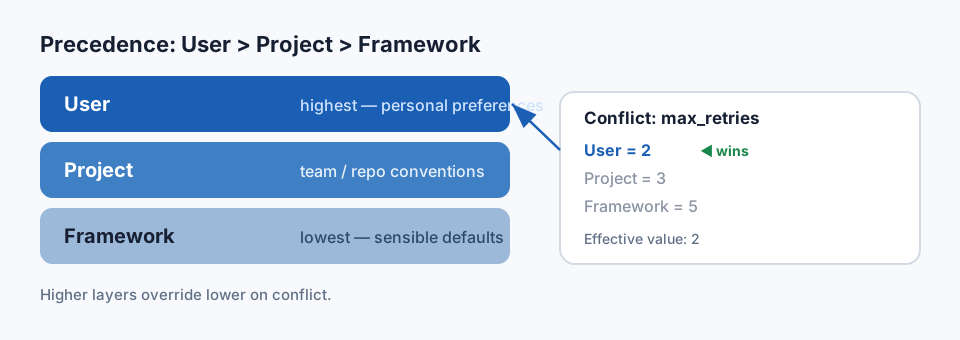
Precedence rule: user > project > framework. A conflict is resolved by taking the highest-priority value. Each layer's rules can add to a lower layer or override a specific rule, but nothing silently merges.
What a layered rule file looks like
Rule file snippet from layer 2 (project):
 1# Pseudocode: shape of a project-layer rule file
 2# Project rules (ic-core)
 3
 4## Overrides from layer 3
 5- `test.framework`: JUnit 4 (framework default is JUnit 5 — this repo isn't migrated yet)
 6- `naming.booleans`: `isX` or `hasX` (framework default is `isX` — adds `hasX`)
 7
 8## Additions
 9- Database schemas named in `SysSecurity`, `Client`, `LprsGlobal` are canonical;
10  don't invent new ones.
11- Transactions use `investmentcafe.ngs.util.Transactional`, not Spring's or Jakarta's.
The "Overrides from layer 3" section is explicit. An agent reading this file knows exactly what the project is saying no to. Nothing is implicit. Nothing is "surprisingly" different from the framework.
The three failure modes layering prevents
1. Silent override. Without layering, a project rule can accidentally neutralize a security
or safety rule from the framework. Layering forces the override to be named. If a project
file reads "disable confirm-before-destructive", it's visible — and a code review can push
back.
2. Rule drift between repos. Six repos, each slightly different. Without layering, the framework rules "feel the same" but have been locally adjusted everywhere. Layering lets the framework update once, and every repo picks it up automatically. Only the overrides stay local.
3. Personal preferences in a team repo. My preference for a specific git commit style is mine — it shouldn't go in a project file where other devs' agents will inherit it. Layer 1 (user global) is where it belongs. Agents on the same repo now behave consistently per-user, not per-repo.
Enforcement
Three practical details that made layering actually work:
Validation script. validate-rule-layers.py reads every rule file and checks:
- Each override is annotated with the layer it overrides (
[overrides layer 3]). - No two rules at the same layer contradict each other.
- No rule at layer 3 (framework) contradicts another at layer 3.
- Deprecated rules are tombstoned, not silently removed.
Fails CI if any check fails. A silent override added by a PR fails the build.
Precedence hint in the system prompt. The agent's boot sequence includes a one-line reminder: "When rules at different layers disagree, follow the higher layer (user > project > framework)." That line costs ~15 tokens and reliably prevents cherry-picking in the hard cases.
No layer-skipping. A rule can only override the layer immediately below it or at the same level. Layer 1 can't bypass layer 2 and claim precedence over layer 3 differently from how it treats layer 2. Keeps the mental model simple.
When this bites
Three real cases where layering changed the outcome:
- Rule: "Always run tests before committing." Framework default. I'm in a session where
the tests are flaky and I know it. Layer 1 override:
allow-skip-tests: truewith a comment explaining the local flake. Framework stays strict; my sessions proceed. - Rule: "Prefer
@Autowiredfield injection." Project default on a legacy repo. Framework default (newer) says constructor injection. The project override is named; new modules in the same repo can carry[overrides layer 3]: @Autowiredon files that already use it, but new files follow the framework. Mixed codebase stays coherent. - Rule: "Default to 4-space indent." Framework. One repo uses tabs. The project
rules/indentation.mdoverrides to tabs with a one-sentence justification. Every agent session in that repo reads the override. The agents stopped reformatting the whole file on every edit.
What not to put in which layer
- Security rules → framework. Never let a project override "don't log secrets" or "confirm
before
rm -rf." These rules are deliberately below the override surface. - Codebase-specific conventions → project. "Use JUnit 4," "pool naming," "transaction type" — anything tied to this repo's history.
- Personal taste → user global. Commit message style, local tooling, review tone. Nothing that other developers should inherit by default.
When layering is overkill
Two cases where layering hurts more than it helps:
1. Single-developer, single-repo projects. If you're the only user and there's only one project, you have two "layers" — the framework and your own additions — and no team-wide coherence problem to solve. Flat rules are faster to reason about.
2. Rapid-prototyping agents. When you're iterating on the agent itself week-to-week, layered rules add friction. Flatten first; add layering once the rules stabilize.
The pattern pays off at team scale (multiple devs, multiple repos, long-running agent). For hobby projects, don't bother.
The dashboard view
Every time the validation script runs, it emits a layer summary:
Framework: 143 rules
Project (ic-core): 28 rules (12 overrides, 16 additions)
User (markon): 7 rules (3 overrides, 4 additions)
Conflicts caught: 0
That bottom line is the one I check. A conflict means an override wasn't named explicitly, and the fix is a one-line annotation. Four months in, we average one caught conflict per PR touching rules — exactly where I want it to be.
Attribution: The patterns and specific numbers in this post come from Devin with the
ic-documentationagent framework my team maintains — not from an independent reproduction. See the series intro for the full disclosure. The patterns themselves generalize to any coding-agent setup.
Related reading
- The 500-line skill limit — each layer carries token cost, so layering interacts with the budget work.
- Why your coding agent needs a different critic — the critic reads the layered rule set when it falsifies, so unambiguous rules make the critic reliable too.
Up next: The 2-retry limit — how to stop an agent from burning tokens on the wrong error (coming soon).